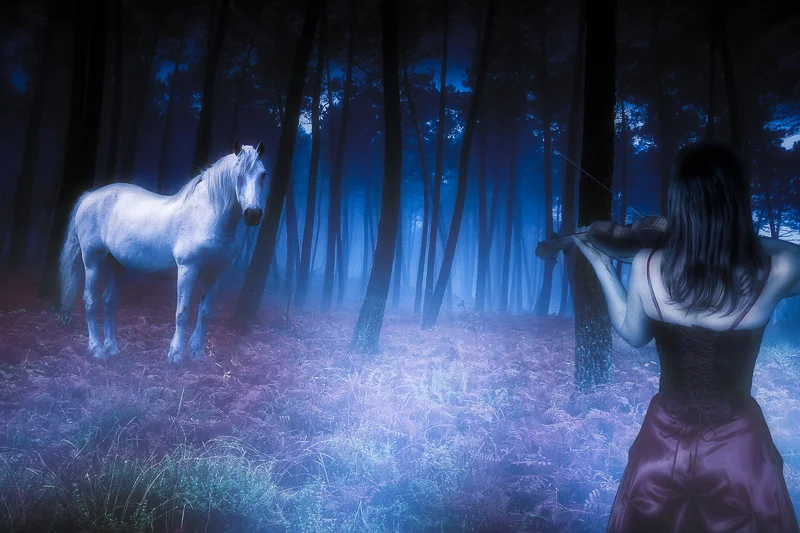
Let me first take this opportunity to thank Rick for inviting me to do a guest post on his blog. What a tremendous honor for me, especially since it’s my first guest post ever. In this post I will explain what led up to the creation of one of my latest images entitled “Dream”, as well as some of the basic techniques I used on it. I won’t be too technical, just give a general overview.
My “Dream”
After seeing Rick’s post on his blog regarding “10 tips for photographing running horses” I knew I wanted to create something horse-related. To me, wild horses convey a sense of freedom, powerful energy and movement – Oh how I’d love to be able to touch one! That is a dream of mine. I wondered: “What might it take to lure a wild horse right up to you?” I decided to create an image depicting one possible way.
Music Soothes the Savage Beast
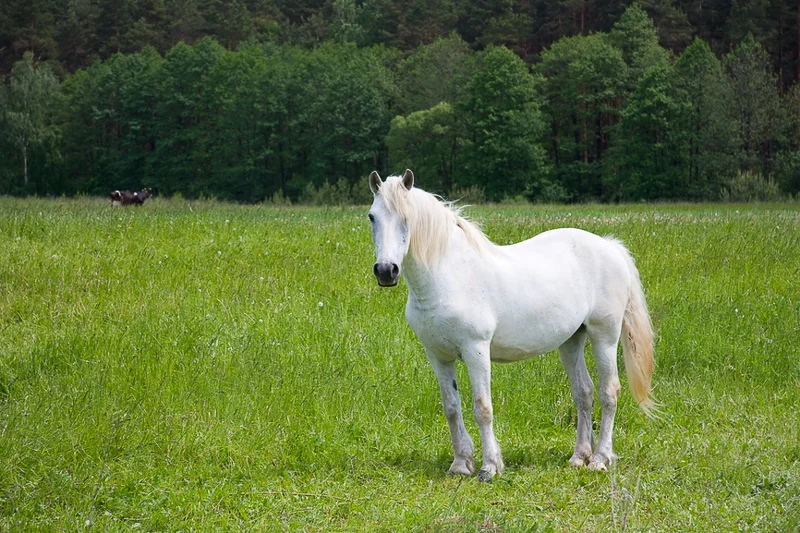
First I needed a horse. Because I wanted to depict something surreal (i.e. from a dream), I did not want a running horse. I found an image of a white horse at rest and looking up as if it was curiously staring at something.
Second, I wanted to depict someone or something luring the horse while getting its attention. You’ve probably heard that “music calms the savage beast” so why couldn’t music lure a wild horse? (Hey, it’s art – anything goes!) I settled on an image of a woman in a red dress with her back towards the viewer playing the violin.

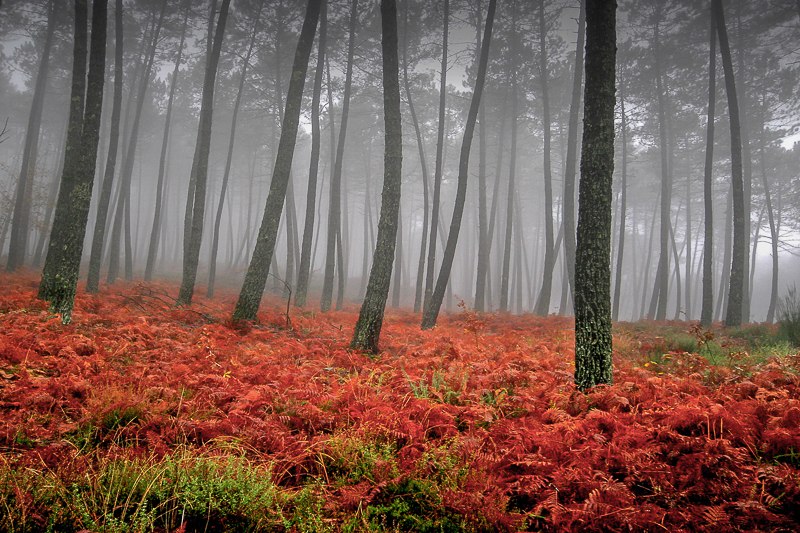
To anchor the various elements together I needed a suitable background. I wanted a gentle, natural background to lend a gentle, calming vibe. I chose a nice forest scene with overcast light.
Making the Basic Composite
Using the forest scene as the background, I needed to place the horse in it. To achieve this I used Photoshop’s amazingly effective and aptly named quick selection tool, along with its refine edge tools. If you have ever used Photoshop’s refine edge tools before you know how tricky it can be to accurately select stuff like hair. In my case it was the horse’s mane and tail. The key to any accurate selection is to take your time. Don’t rush, and vary the size and feather of your brush as needed.
Once I got the horse extracted it was then a matter of moving it onto the background forest scene. Once I moved the horse onto the background I noticed that it did not look quite right. How so? Most people are used to reading from left-to-right, and I like the viewers of my images to do the same. Since the horse was facing left, I simply flipped him around using Photoshop’s transform tools. Much better.
Of course I had to resize the horse to give it a proper sense of scale. No hard and fast rules here, I just adjusted its size until it looked natural. The same selection techniques were used on the image of the woman. Since she was facing towards the horse I did not need to flip her around, just scale her accordingly.
Adding Effects (aka “The Fun Part”)
Now it’s time to add lighting and effects to really sell the “Dream”. I love Photoshop, but most often I will use effects plug-ins to get the kind of results I want more quickly and easily. When I think dream I think twilight. Not the movie, but the actual time of day when the sky has that nice blue cast to it. With this in mind I added the “Day For Night” effect from OnOne’s Perfect Effects 4 separately to the background layer, the layer containing the horse, then the woman. When possible I like to add effects to individual layers themselves rather than on a flattened version of an image because it gives me greater flexibility in varying an effect’s opacity or the ability to add or remove effects as needed.
As Rick will always tell you, any successful photograph or image is about the quality and direction of the light! When creating image composites you have to give them a sense of depth. You don’t want your subjects looking like they were just pasted in place. To give the horse and woman a more natural 3D look I added inner and outer layer styles to each individual image element to simulate soft wrap-around light. This also adds natural looking shadows.
To give the illusion of atmosphere and distance between the woman and the horse, I created a “fog layer” which consists random white brush strokes of varying size, generously blurred via the Gaussian Blur filter. I repeated this step on another layer, this time on top of the woman to make it look like she was literally in the fog. Using layers masks on each the “fog layers” allows me to control their density (opacity) in a realistic way.
At this point I could have called the image done, but I still felt it was missing something. For a moonlit forest scene such as this one, I thought that having moonlight streaking through the trees would be a nice touch to add even more depth and realism. Copying the image’s highlights onto its own layer and applying the radial blur filter with the “zoom” setting achieves this. Once I found settings that looked good I used a layer mask to hide the effect from the obvious spots where it should not appear such as the horses head, etc. I then adjusted the opacity to taste.
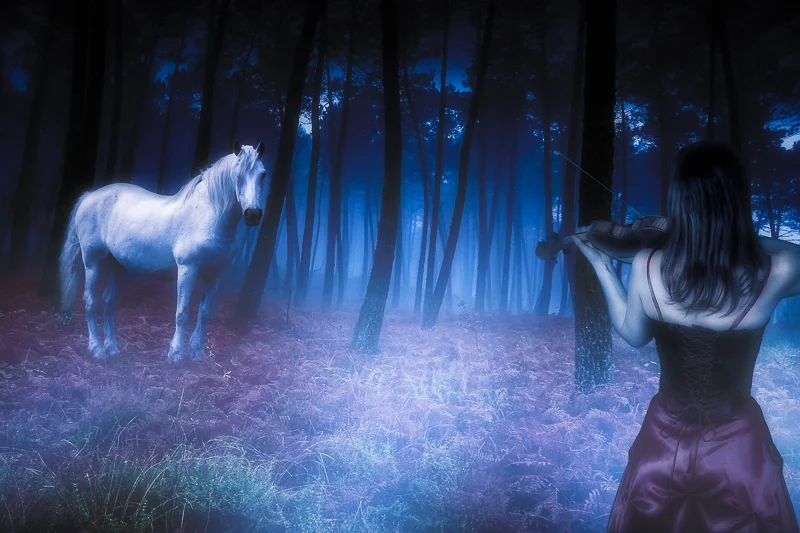
There you have it! One possible way to lure a wild horse. It’s a dream-like image that captures my imagination and hopefully yours as well.
About Marco Ranieri
Marco is a photography and Photoshop enthusiast, and is a member of the National Association of Photoshop Professionals (NAPP). He does not limit himself to any particular photographic genre; rather he just seeks to create interesting imagery. As an active member of the Google+ community he posts many of his latest works there. Please feel free to contact him using the contact information below, as he loves to interact and share ideas and information with people.
Marco Ranieri
Marco Ranieri Photography
Web: www.ranieriphoto.com
Google+: gplus.to/marcoranieri
e-mail: ranieriphoto@me.com
This site powered by (designed and hosted on) Squarespace. Use one-click to get started with your own awesome Squarespace site.